Bundle & Save; 10% discount
Healthy air. Clean floors. Without effort.
Up to 40% summer discount on the entire range

360+ reviews | 25k+ happy customers
360+ reviews | 25k+ happy customers
Discover our award-winning technology for a healthy living environment.
 Excellent reviews | 25,000+ satisfied customers
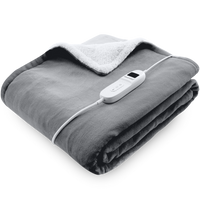
First check that the controller/switch is properly and fully inserted into the blanket (on the Glow and Cloud models, the locking tab clicks into place) and that the plug is connected to a power outlet. Make sure the blanket is fully unfolded and lying flat - not folded or crumpled, as it will not heat properly. Turn on the blanket and select a higher heat setting; allow it to warm up for a few minutes. If the blanket switches off by itself, the timer may have elapsed or the overheating protection may have been activated: turn it off, let it cool completely, reconnect the controller, and restart it. If the problem persists, stop using the blanket and contact customer service.
This varies by model, so always disconnect the controller/cable first and let the blanket cool completely. The newer Glow (BF201/BF202) and Cloud (BF203) blankets are machine washable at a maximum of 30 °C with the detachable controller removed. The Kindle (BF204) underblanket is best washed by hand only at a maximum of 30 °C and no more than twice a year. For all models: do not dry-clean, tumble-dry, or iron, and then leave the blanket flat to air-dry out of direct sunlight (not near a radiator or while switched on). Always follow the care label on your blanket.
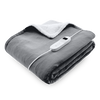
We have various blankets and sizes. The Glow models are available as an overblanket measuring 160 x 130 cm (BF201) and as a larger 180 x 160 cm version (BF202), with 9 heat settings and a timer. The Cloud (BF203) is a blanket with 9 heat settings and a display. There is also the Kindle electric underblanket, available in a single size (150 x 80 cm, BF204) and a double size (BF205); you place the underblanket under the sheet, and it has 3 heat settings. An underblanket lies beneath you, while an (over)blanket goes over you.
With the controller, you select the heat setting and set the timer. The Glow and Cloud blankets (BF201/BF202/BF203) have 9 heat settings (1–9) and a timer; the Cloud starts on setting 5 with the timer set to 1 hour, and the timer increases stepwise up to a maximum of setting 9, after which it returns to 1. By default, the blanket starts on the lowest setting. The timer automatically switches the blanket off after the set time - useful for preheating the blanket before going to bed. For use while sleeping, we recommend heat setting 1. The Kindle heated underblanket (BF204) has 3 heat settings and no timer.